Minehut
This tells how to set up a custom domain over at Minehut
Notes
- Use of this feature is to paid plans only to remove free 5 hour limit on free servers (where the custom domain was also recahable before) since August 5th 2026 forward, any custom domain in a free server plan since September 3rd 2026 forward STOPPED resolving and only be resolved via their
<name.minehut.gg>java or<name.bedrock.minehut.gg>Bedrock Address, the minimum plan is Standard to use this feature - The Legacy Dashboard has been replaced by the new Dashboard (which is kinda meh). The legacy dashboard is kept here for archival purposes.
To Get Started
Go to your Dashboard, click on "Manage" on a server and go to the "Settings" Tab, under "Custom Domains" below "SFTP" click on "Add Domain"

Then type your domain to be as!
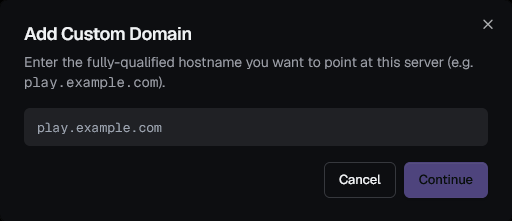
After you typed it and clicked on next go to your registrar's DNS records and add the 2 TXT values containing what they do, make sure to copy the values to the clipboard! (and after click on save or add)
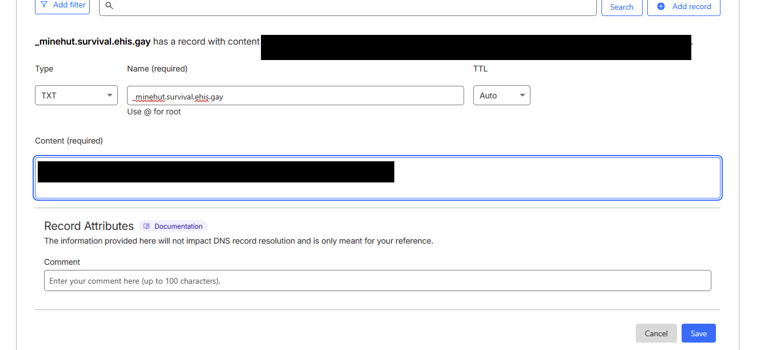
How to make it resolve:
Now you need to select where your domain is at!
THIS depends on if the address you are adding has already a CNAME pointed to an website, if it is, you need to use SRV records and it can allow what type of players to join (Depending which type of playerbase)
Verifying using CNAME Records (I don't have a website pointed to the domain)
Verifying using SRV records (I have a website pointed to the domain)
Verifying using CNAME Records
If you don't have a website pointed at your domain you verified it with minehut, then it is straightforward to follow
On your DNS records registrar provider, click on add and make its type a CNAME record having the following:
- The name: Your domain you added to minehut
- Target:
<name>.minehut.gg(the name has to be the exact server name you created on minehut followed by minehut.gg, for bedrock that's<name>.bedrock.minehut.gg)
If you are in Cloudfare then set its proxy status to DNS only (or disabled)
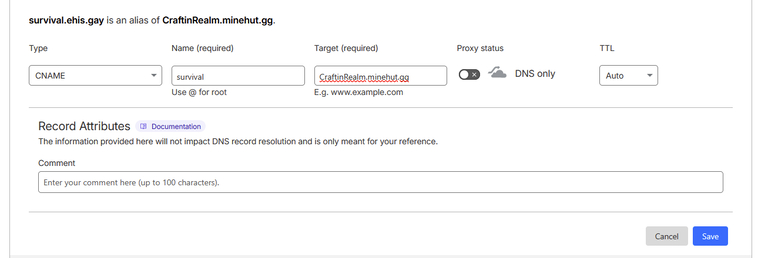
If an address has pointed to Java's CNAME and you want to support bedrock you need to make another domain using the already steps but using bedrock's address of your server
Then click on Save and wait for the DNS to propagate globally (you gotta be patient as it takes time), then if in your Minecraft Client adding your domain to the server list pings to Minehut, you're good to go!
Verifying using SRV records
IF you have a website those provider uses CNAME Records then it is a little bit complicated to follow (your provider depends on it)
On your DNS records registrar provider, click on add and make its type a SRV record having the following:
When adding the name value:
If your domain you verified IS a subdomain add a dot at the end followed by its subdomain name, for example _minecraft._tcp.survival but if your domain verified isn't a subdomain, then leave the name value as it is as your registrar will point it to your parent domain
- Name:
_minecraft._tcp - Priority: 1
- Weight: 1
- Port: 25565
- Target:
<name>.minehut.gg(the name has to be the exact server name you created on minehut followed by minehut.gg, NOT<name>.bedrock.minehut.gg)
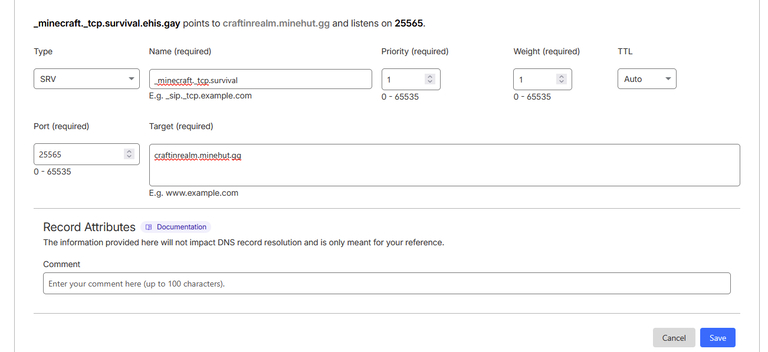
If an address has pointed to Java's CNAME and you want to support bedrock you need to make another domain using the already steps but using bedrock's address of your server
Then click on Save and wait for the DNS to propagate globally (you gotta be patient as it takes time), then if in your Minecraft Client adding your domain to the server list pings to Minehut, you're good to go!
Your domain is verified can be resolved if right next to your domain you have Verified on it
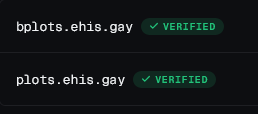
Legacy Dasboard
This applies to all plans (Free and Paid)
Go to your Dashboard after clicking a server you decide to add its custom subdomain and click on "Add Domain" below SFTP

Then type your domain to be as!
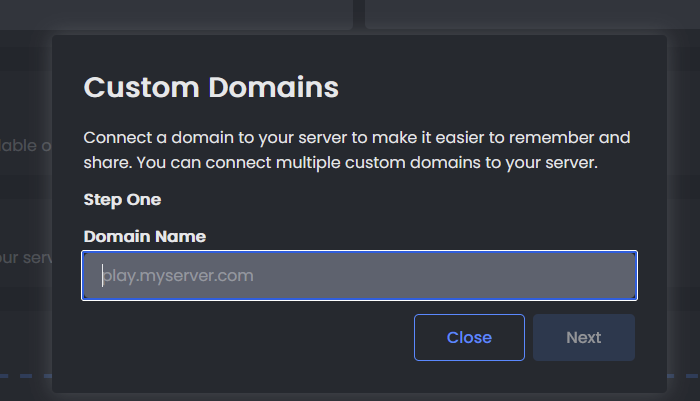
After you typed it and clicked on next go to your registrar's DNS records and add 2 TXT values containing what they do, make sure to copy the values to the clipboard! (and after click on save or add)
After adding both (including its TCPShield TXT Verification) click on verify only when it actually propagates (this depends on your registrar so be patient about it) and minehut says "Verified" on the domain you just added
How to make the domain actually resolve
Hold up!
Minehut has since fixed this, the thing actually tells to add a record to make it reachable, this still explains if you have a website pointed to THAT same domain, or not
YOU are not done, and for some reason Minehut does not tell there's a second verification you need to do until you check their support, this has to do with actually making your created IP to resolve and ping to minehut, THIS may however depend if that domain (or subdomain) already points to an Website using CNAME records, to follow around the guide you have to actually click below if you do have a website or not using the same domain name
Verifying using CNAME Records (I don't have a website pointed to the domain)
Verifying using SRV records (I have a website pointed to the domain)
Verifying using CNAME Records (Legacy)
Warning
This only lets Java players join
If you don't have a website pointed at your domain you verified it with minehut, then it is straightforward to follow
On your DNS records registrar provider, click on add and make its type a CNAME record having the following:
- The name: Your domain you added to minehut
- Target:
<name>.minehut.gg(the name has to be the exact server name you created on minehut followed by minehut.gg, NOT<name>.bedrock.minehut.gg)
If you are in Cloudfare then set its proxy status to DNS only (or disabled)
Then click on Save and wait for the DNS to propagate globally (you gotta be patient as it takes time), then if in your Minecraft Client adding your domain to the server list pings to Minehut, you're good to go!
Verifying using SRV records (Legacy)
Info
This lets Java and Bedrock Players join
IF you have a website those provider uses CNAME Records then it is a little bit complicated to follow (your provider depends on it)
On your DNS records registrar provider, click on add and make its type a SRV record having the following:
When adding the name value:
If your domain you verified IS a subdomain add a dot at the end followed by its subdomain name, for example _minecraft._tcp.survival but if your domain verified isn't a subdomain, then leave the name value as it is as your registrar will point it to your parent domain
- Name:
_minecraft._tcp - Priority: 1
- Weight: 1
- Port: 25565
- Target:
<name>.minehut.gg(the name has to be the exact server name you created on minehut followed by minehut.gg, NOT<name>.bedrock.minehut.gg)
Then click on Save and wait for the DNS to propagate globally (you gotta be patient as it takes time), then if in your Minecraft Client adding your domain to the server list pings to Minehut, you're good to go!
That's it you added a domain to Minehut and make it resolve it!!!